Skillshare review (2026): good value for creative practice, with a strict refund window
Skillshare is a subscription library of short, project-based classes, strongest in illustration, design, photo, video and creative business. It's good value if you actually make the class projects. The trial and refund rules are stricter than most people expect.

No affiliate links: Active Learning Site currently has no affiliate relationships. Links to platforms and sellers earn us nothing. Our disclosure.
projectsbest for
Our verdict (editorial opinion)
Skillshare suits hobbyists, freelancers and early-career creatives who learn by doing short projects. Its depth runs out for advanced or technical topics, there's no accredited certificate, and the free trial converts to a full year's charge. Refunds are only possible within 48 hours of that charge, and only if you haven't used Skillshare since. Set a reminder before the trial ends.
Last verified: 31 October 2026 · Research-based review (no hands-on testing claimed) · Prices shown are US list prices from official pages unless marked otherwise
The short version
- Price (US): Skillshare's pricing page showed an annual payment of $167.88 USD ($13.99/month paid annually) on 31 Oct 2026. Pricing is region-specific.
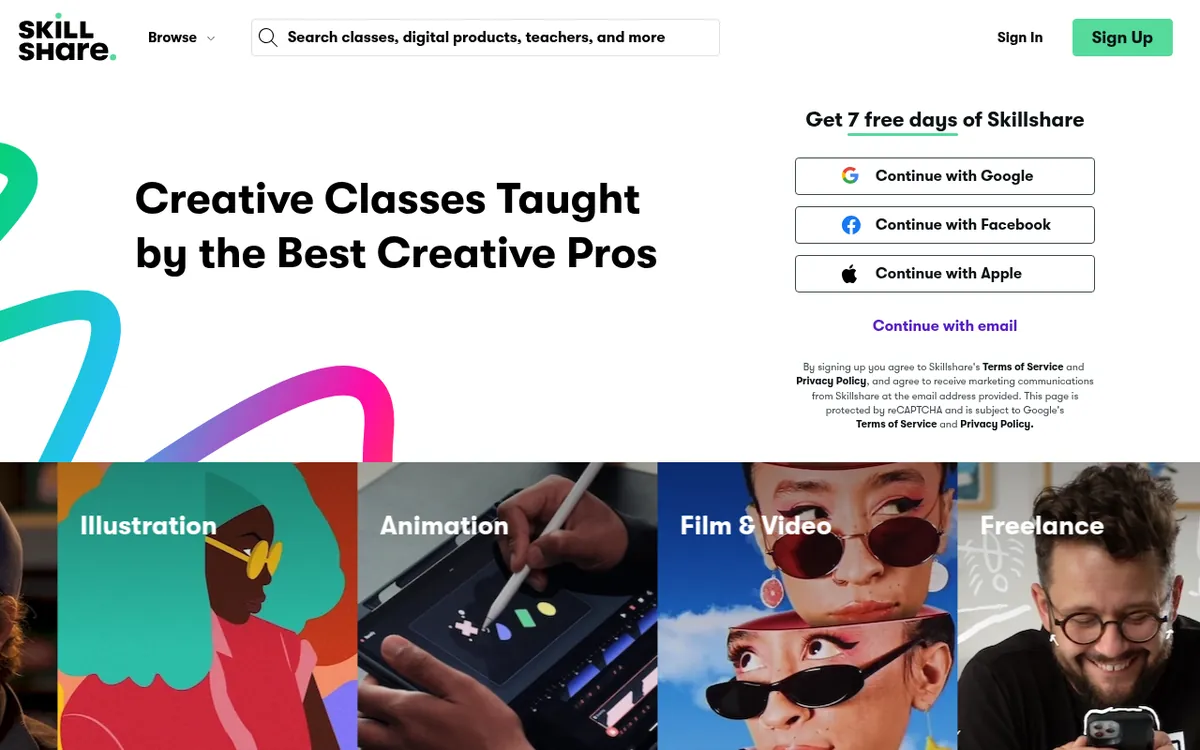
- Trial: a free trial (commonly 7 days) requires payment details and charges automatically at the end unless you cancel. Skillshare says it emails a reminder before the trial ends.
- Refunds: after a 7-day trial, contact Support within 48 hours of the charge for a one-time refund, but only if you haven't used Skillshare since. Trials of 14+ days and renewals get no refund.
- Catalog: Skillshare says "thousands" of classes, with offline viewing, subtitles and transcripts on desktop and iOS/Android.
- No accredited credentials. It's for building skills and a portfolio, not a CV line.
Who Skillshare is for (and who should skip it)
Good fit
- Beginner-to-intermediate illustrators, designers, photographers and video creators
- Freelancers who want creative-business basics (branding, social media, pricing)
- People who want to try many mediums (gouache, ink, Procreate, animation) for one price
- Learners who like short classes with a project
- Teens and students with time to fill productively
How Skillshare works
A subscription unlocks the whole catalog. Most classes are short, often 20–60 minutes of video according to long-term reviewers, broken into bite-sized lessons and built around a class project you complete and can post to the class's project gallery for comments. Teachers are mostly working creatives. Skillshare also produces "Originals" with better-known instructors, and offers curated learning paths that sequence classes from beginner upward.
Anyone who meets Skillshare's requirements can teach, so quality ranges widely. Reviews and project galleries are your best quality signals. A good gallery full of student projects tells you the class actually gets people making things.
Price and plans
| Plan | Price | Billing | Notes |
|---|---|---|---|
| Annual membership (US, web) | $167.88 USD per year (shown as $13.99/month) | Charged once a year, after any trial | From Skillshare's pricing page, 31 Oct 2026 |
| Monthly / app-store plans | Varies; third-party reviews report higher effective monthly prices via app stores | Monthly | Managed and refunded by Apple or Google if bought in-app |
| Skillshare for Teams | Per seat (check Skillshare's Teams page) | Annual | Billing may be managed by your employer |
| Regional pricing | Varies by country | — | Skillshare's help center says to check the pricing page for your region |
Promotions such as a percentage off the first year appear regularly, and creator promo codes sometimes extend the trial. Note that a longer trial (14+ days) removes your refund option entirely. Check the current price on Skillshare's official pricing page before you buy.
The trial and refund rules, exactly
| Situation | Refund? | What you must do |
|---|---|---|
| 7-day free trial converted to paid | Yes, one time only | Contact Support within 48 hours of the charge, and don't use Skillshare after the charge |
| Free trial of 14 days or longer, converted | No | Cancel before the trial ends |
| Annual or monthly renewal | No | Cancel before the renewal date. Skillshare sends a reminder email before annual renewals |
| Bought through Apple App Store or Google Play | Per Apple/Google policy | Request from the store, not Skillshare |
| Access through Skillshare for Teams | Employer-managed | Ask your admin |
The reason this matters: Skillshare's trial converts straight to an annual charge on the standard web plan. Forgetting a trial costs a year's fee, and the only escape hatch is that one-time, 48-hour, no-use refund. Several Reddit threads and review sites describe people missing it.
How to cancel Skillshare (desktop, iPhone and Android)
On desktop:
- Go to Account Settings.
- Click Membership & Payments.
- Select Cancel membership and follow the steps, then keep the confirmation.
On a phone: Skillshare's help center says to open your browser, not the app, go to account settings, and cancel under Membership & Payments. If you originally subscribed through the App Store or Google Play, cancel in that store's subscription settings instead.
After cancelling, access continues until the end of the current billing period.
What Skillshare is genuinely good at
- Illustration and drawing: its strongest area. Procreate, ink, gouache, watercolour, character design, sketchbook practice.
- Graphic design and branding: logo design, typography and Canva or Adobe basics for beginners.
- Photo and video: phone photography, Lightroom, Premiere and YouTube-style editing.
- Animation: intro classes in After Effects and 2D animation.
- Creative business: freelancing, pricing, social media and productivity for creatives.
One unsponsored reviewer with an art degree, who did eight illustration classes over a trial, loved emulating the styles of artists she follows and using classes as an excuse to try new materials. She called Skillshare's customer support one of the best she'd experienced.
Where Skillshare is weak
- Depth: the same reviewer found most classes too easy for her level, and its difficulty filter didn't surface genuinely advanced classes.
- Unclear time commitment: she found one "hour-long" class took four or five days of real project work, while others took exactly the listed time.
- Uneven quality: creators on r/MotionDesign and r/ArtistLounge say some classes are no better than free YouTube tutorials.
- Technical topics: coding and data classes exist but aren't a strength.
- Freshness: it can be hard to tell when a class was recorded, which matters for software classes.
Certificates: what exists and what it's worth
Skillshare doesn't offer accredited certificates. Some third-party reviews report completion badges or certificates, but they carry no academic or professional weight. For a creative career, your portfolio is the credential. Post every class project and keep the best ones for your portfolio site.
Pros and cons
What we like
- One price for the whole catalog: US$167.88/yr is cheap compared with buying classes individually
- Project-based classes push you to actually make things
- Strong in illustration, design, photo, video and creative business
- Short classes are easy to fit into a week
- Offline viewing, subtitles and transcripts in the apps
- Project galleries and community feedback
- Reminder emails before trial end and annual renewal
What to watch out for
- Trial converts to a full annual charge
- Refund only within 48 hours of the charge, once, and only if unused
- No refunds on renewals or long trials
- Mostly beginner-to-intermediate depth
- Quality varies; anyone can teach
- No accredited certificates
- Subscription-only, so there's no way to buy just one class
What learners say
| Source | Recurring praise | Recurring complaints |
|---|---|---|
| YouTube: unsponsored review by an illustrator with an art degree (uyD3DubZpwI, older) | Classes from favourite creators; trying new mediums; excellent support | Too easy for her level; advanced classes hard to find; unclear real time per class; didn't renew because she lacked time |
| YouTube: Simon Crowe, "Skillshare Review – Is It Worth The Money?" | Fair value at about $14 a month on the annual plan | The trap is paying for a year and then not using it |
| YouTube: Rachel Schmidt, "Skillshare Review (Unsponsored)" (2021) | Good range of beginner classes | When she cancelled, Skillshare offered an extra free month before the cancellation went through; earlier promo prices weren't offered again |
| Trustpilot | Fast, helpful support replies | Trial-to-annual charges and refund requests. Skillshare showed 4.0/5 from 4,236 reviews on 31 Oct 2026, but it actively invites reviews, so it isn't comparable with uninvited scores |
| YouTube: Daniel | Tech & Data, two-year user review (Mar 2026) | Price for unlimited access; project-based learning; good app; community; short classes | No accredited certificates; uneven quality; weak for programming; subscription-only. Creator uses affiliate links |
| Reddit (r/MotionDesign, r/ArtistLounge, r/blender) | Great beginner classes; good for trying mediums | Some classes equal free YouTube; refund and billing disputes |
| Review sites (legitscout, clickoff) | Value for creatives | Trial-to-annual auto-charge and the narrow refund window |
Skillshare vs Domestika vs Udemy vs MasterClass vs YouTube
| Platform | Model | Price (US) | Strength | Weakness |
|---|---|---|---|---|
| Skillshare | Subscription | $167.88/yr | Short creative projects, huge variety | Depth; refund rules |
| Domestika | Buy courses individually (frequent sales) or subscription | Varies | Longer, more in-depth creative courses you keep | Paying per course adds up |
| Udemy | Buy per course or Personal Plan | Sale prices vary | Software and technical creative tools | Quality varies; little community |
| MasterClass | Annual subscription | $120–$240/yr | Inspiration from famous names | Not step-by-step |
| YouTube | Free | $0 | Endless tutorials | No structure or projects |
See Skillshare vs MasterClass for a deeper comparison.
Is Skillshare good value? The arithmetic
At US$167.88 a year, Skillshare costs about US$14 a month. Here's what that looks like per class you actually finish:
| Classes finished per year | Cost per class |
|---|---|
| 3 | about US$56 |
| 12 (one a month) | about US$14 |
| 26 (every two weeks) | about US$6.50 |
| 52 (one a week) | about US$3.20 |
Compare that with buying single creative courses on Domestika or Udemy, which are often discounted to a low price each during sales. If you'll only take two or three classes, buying individual courses is usually cheaper and you keep them. If you'll take one or more a month, Skillshare's subscription wins.
How to spot a good Skillshare class in two minutes
- Check the project gallery. Many finished student projects show that the class gets people making things.
- Read recent reviews and look for comments on level ("too basic", "great for beginners").
- Look at the teacher's profile for real work, a portfolio and other classes with good feedback.
- Check the software version for Procreate, Adobe or video-editor classes. Older interfaces can confuse beginners.
- Watch the intro lesson to judge audio quality, pace and teaching style.
- Prefer Originals and learning paths for structured progress across several classes.
Sample learning paths (build your own)
| Goal | Suggested sequence | Time |
|---|---|---|
| Start digital illustration | Procreate basics → character design → a colour theory class → a sketchbook project challenge | 4–8 weeks at 2–3 hrs/week |
| Freelance graphic designer | Design fundamentals → logo design → branding → pricing and client work for freelancers | 6–10 weeks |
| YouTube or social video | Phone filmmaking → an editing class (Premiere or DaVinci) → thumbnails and channel strategy | 4–6 weeks |
| Photography | Composition → manual mode → Lightroom editing → a photo-series project | 4–8 weeks |
Skillshare traps to avoid
- Trial-to-annual conversion: forgetting your trial end date costs a full year's fee.
- Using it after the charge: any use after conversion voids the 48-hour refund.
- Longer "free" trials: 14+ day promo trials aren't refundable once they convert.
- Cancelling in the iOS app: Skillshare's help says to use a browser. If you subscribed through the App Store, cancel there.
- Assuming a certificate: nothing on Skillshare is an accredited credential.
How to get your money's worth
- Before the trial, list three classes you'll finish and their projects.
- Put a reminder in your calendar two days before the trial ends.
- Do one class per week and post the project. The reviewer above found this pace sustainable.
- Check the project gallery before starting a class, since it's the best quality signal.
- Download classes for offline viewing on commutes.
How we researched this review
We have not bought or used Skillshare for this review. It is built from Skillshare's own pricing, help-center and terms pages (read on 31 October 2026), publicly posted learner reviews and discussions, YouTube reviews by long-term users (transcripts read in full and paraphrased below), and the pages that currently rank for this topic, which we checked so we could cover what they miss. We note where a figure comes from a third party rather than the official site. We do not give star ratings or numeric scores, because we have not tested the product hands-on.
We could not capture live checkout screenshots, so we cannot show what checkout looks like in your country. Prices vary by region and change with promotions. Check the current price on the official page before you pay.
Skillshare FAQ
How much does Skillshare cost?
On 31 October 2026 Skillshare's US pricing page showed an annual payment of $167.88 USD ($13.99 a month, paid annually). Prices vary by region, so check the official pricing page.
How long is the Skillshare free trial?
Skillshare's standard trial is 7 days, although promotions and creator codes sometimes offer longer trials. A trial of 14 days or longer isn't eligible for a refund after it converts.
Does the Skillshare trial charge automatically?
Yes. Payment details are required and your card is charged at the end of the trial unless you cancel first. Skillshare says it emails a reminder before the trial ends.
Can I get a refund from Skillshare?
Only in one case. After a 7-day trial converts, contact Support within 48 hours of the charge for a one-time refund, as long as you haven't used Skillshare since. Longer trials and renewals aren't refundable.
How do I cancel Skillshare?
On desktop, go to Account Settings → Membership & Payments → Cancel membership. Access continues until the end of the billing period.
How do I cancel Skillshare on iPhone?
Open a web browser (not the app), sign in, and cancel under Membership & Payments. If you subscribed through the App Store, cancel in your Apple ID subscriptions instead.
Does Skillshare renew automatically?
Yes, subscriptions renew automatically unless cancelled, and renewals aren't refundable. Skillshare sends a reminder email before annual renewals.
Does Skillshare give certificates?
Skillshare doesn't offer accredited certificates. Any completion badge has no formal value. Your portfolio of class projects is the real proof of skill.
Can I download Skillshare classes?
Yes. Skillshare lists offline viewing as a feature in its mobile apps.
Is Skillshare good for beginners?
Yes. Much of the catalog is aimed at beginners, which is also why advanced learners can find it too easy.
What are the best Skillshare classes?
Its strongest areas are illustration (especially Procreate and ink), graphic design, photography, video editing and creative business. Check the project gallery and recent reviews of any class.
Is Skillshare worth it for artists?
For beginner-to-intermediate artists who want to try many mediums and styles, yes. Advanced artists often find classes too easy.
Skillshare or Udemy?
Skillshare for creative project classes on one subscription. Udemy for technical software skills and courses you keep forever.
Skillshare or Domestika?
Domestika courses tend to be longer and more in-depth and you can buy them individually. Skillshare gives broader variety for one annual price.
Skillshare or MasterClass?
Skillshare if you want to practise and make things, MasterClass if you want inspiration from famous names.
Is Skillshare good quality?
It varies because many independent teachers publish classes. Skillshare Originals and classes with active project galleries tend to be the strongest.
Does Skillshare have a team plan?
Yes. Skillshare for Teams is sold per seat to companies, and billing may be handled by your employer.
Can I pause my Skillshare membership?
Skillshare's help center describes cancelling, not pausing. If you cancel from Account settings → Membership & Payments, you keep access until the end of the period you paid for. Uninstalling the app does not cancel.
Sources and last verified
Last verified: 31 October 2026. Official pages were read on that date. Third-party figures are attributed and dated where we cite them.
- Skillshare pricing page (annual payment of $167.88 USD)
- Skillshare help: Can I get a refund? (48 hours after a 7-day trial; no refund for 14+ day trials or renewals; EU/UK cooling-off) — checked 31 Oct 2026
- Skillshare help: What does Skillshare cost? (regional pricing; monthly via app; US-only gift memberships) — checked 31 Oct 2026
- Skillshare help: How do I cancel my subscription? — checked 31 Oct 2026
- Skillshare help: cancelling if you signed up through the app — checked 31 Oct 2026
- YouTube: Simon Crowe, Skillshare Review – Is It Worth The Money?
- YouTube: Rachel Schmidt, Skillshare Review (Unsponsored) — 2021
- Trustpilot: Skillshare — score changes
- YouTube: unsponsored Skillshare review by an illustrator — older review
- YouTube: Daniel | Tech & Data, Skillshare review after 2 years — creator uses affiliate links
- Reddit search: Skillshare worth it (r/MotionDesign, r/ArtistLounge, r/blender threads) — community threads
Try Skillshare
Plan three classes, then set a reminder before the trial ends.
Check the current trial →