LinkedIn Learning review (2026): useful, short and often free through your library
LinkedIn Learning offers 25,000+ short, professionally produced courses on business, tech and creative skills. In 2026 you can't buy it on its own. Individuals get it through LinkedIn Premium, an employer or school, or often free through a public library.

No affiliate links: Active Learning Site currently has no affiliate relationships. Links to platforms and sellers earn us nothing. Our disclosure.
coursesbest for
Our verdict (editorial opinion)
LinkedIn Learning is a solid library of short, polished, practitioner-taught courses, best for filling specific skill gaps and refreshing software skills. Check your library card and employer first, because many people can use it free. Paying for Premium Career just for Learning only makes sense if you also want Premium's job-search features. Certificates are nice profile signals, not credentials.
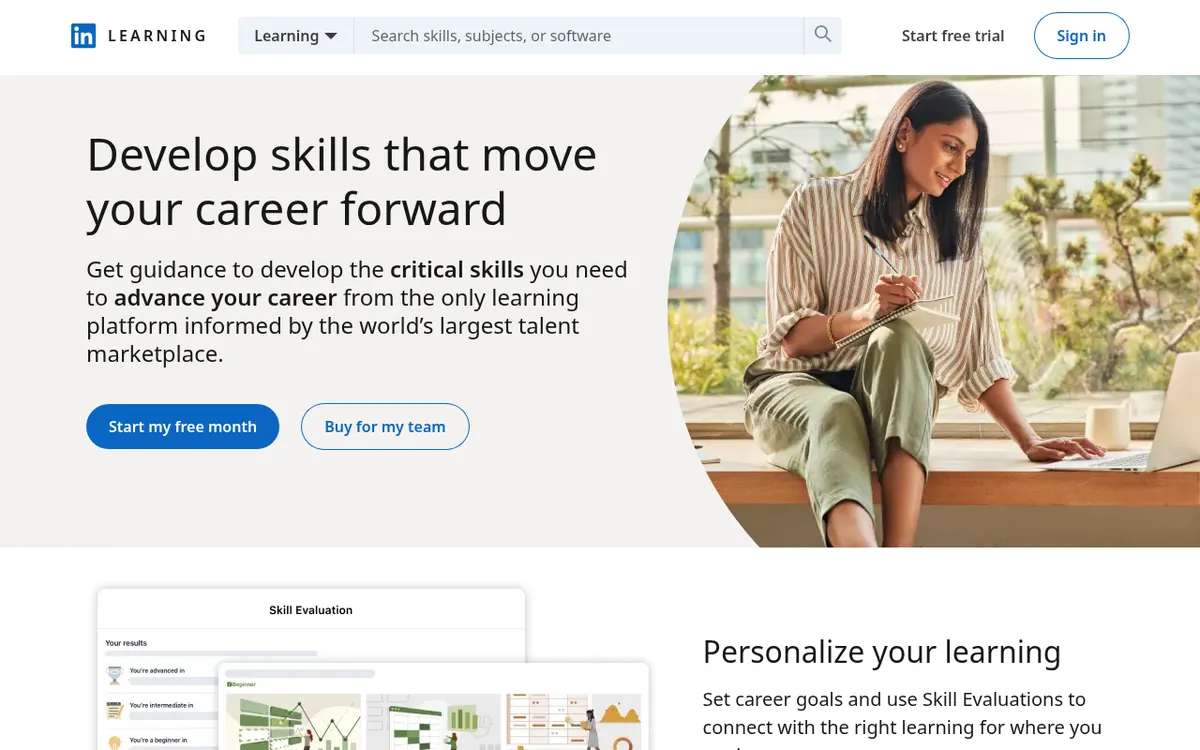
Last verified: 31 October 2026 · Research-based review (no hands-on testing claimed) · Prices shown are US list prices from official pages unless marked otherwise
The short version
- No standalone plan: LinkedIn's help center says there's no individual LinkedIn Learning subscription and courses can't be bought one by one. Premium is the closest option for individuals.
- Ways in: LinkedIn Premium (Career and other tiers include Learning), an employer or university licence, or a public library that subscribes.
- Premium Career price: US$39.99/month or US$239.88/year on LinkedIn's official page (31 Oct 2026). Prices vary by region and tax.
- Trial: Premium often offers a one-month free trial that auto-bills when it ends. LinkedIn's help center says cancelling a free trial ends it immediately, and you then can't start another trial for 12 months. Cancel paid Premium at least a day before billing; access lasts to the end of the cycle.
- Refunds: LinkedIn says Premium payments may be refundable within 7 days if you haven't used Premium features. Check terms for your region.
Correction: the old "LinkedIn Learning monthly plan"
Many older reviews, including an earlier version of this page, describe a standalone LinkedIn Learning subscription. That's out of date. LinkedIn's help article "Purchase LinkedIn Learning as an individual" now says there's no individual LinkedIn Learning subscription, and points individuals to Premium. If a site quotes a "LinkedIn Learning only" price, it's out of date.
How to get LinkedIn Learning in 2026
| Route | Cost to you | Certificates on profile | Notes |
|---|---|---|---|
| Public library card | Often free | Download the certificate, then add it to your profile manually | Availability depends on your library. Uses a separate library login, not your LinkedIn profile |
| Employer licence | Free to you | Yes | Your admin may assign courses and see your progress |
| University or school | Free to students and staff | Yes | Common at universities; ask IT or the library |
| LinkedIn Premium (Career and other tiers) | US$39.99/mo or US$239.88/yr for Career | Yes | Comes with InMail, AI tools and job-search insights |
| One-month Premium trial | Free, then auto-bills | Yes | Set a reminder before it ends |
LinkedIn's official Premium Career page also listed C$49.99/mo (C$299.88/yr) in Canada and A$54.99/mo (A$323.88/yr) in Australia. Taxes may apply and promotions change. Check the current price on LinkedIn's official Premium page before you buy.
Free access through your library
Many public libraries in the US, Canada, the UK and Australia license LinkedIn Learning for cardholders. To check:
- Search your library's website for "LinkedIn Learning" (it's often under eResources or Online Learning).
- Sign in with your library card number and PIN. Library access uses its own account, separate from your LinkedIn profile.
- Complete a course, download the certificate, and add it to your LinkedIn profile manually. LinkedIn's help center says library users can't push certificates to their profile directly.
Some libraries offer it under its older name, Lynda.com. If yours doesn't, ask. Some libraries lend eResource access across regions or offer non-resident cards for a fee.
What's included and what isn't
| Included | Not included |
|---|---|
| 25,000+ courses in business, tech and creative topics | Accredited degrees or academic credit |
| Exercise files, quizzes and some hands-on coding exercises | Graded assignments with human feedback |
| Certificates of completion you can add to your profile | Standalone purchase of a single course or a Learning-only plan |
| Courses that prepare for some industry exams, and some CEU/CPE-eligible courses | Industry certification exams themselves (taken through the certifying body) |
| Mobile apps with offline viewing | Live instructor access |
| Learning paths, collections and AI-assisted coaching (feature names change) | Guaranteed course freshness; check the release date |
Course quality: who teaches and how deep it goes
Courses are produced by LinkedIn with vetted instructors, mostly practitioners, so production quality is consistent. That's a real difference from open marketplaces. Most courses are short, often one to three hours split into short videos. That's ideal for "I need to learn pivot tables by Friday" and less ideal for mastering a field.
One long-time user who completed a dozen courses through his employer liked the bite-sized format, practitioner instructors and profile certificates. His cons: courses can feel shallow, quizzes are easy, much of the content is US-centric, and there's little interaction. Learners in an online-learning comparison video likewise wished for deeper, project-based work.
Where LinkedIn Learning is strongest
- Office and business software: Excel, PowerPoint, Microsoft 365, Google Workspace.
- Professional and soft skills: management, communication, presenting, project management.
- Creative software: Adobe tools, video editing and photography (the former Lynda.com strength).
- Tech fundamentals: intro programming, cloud and data. Good for overviews; pair with deeper courses for mastery.
- Exam prep: some courses are aligned with certifications such as project management or cloud exams. The exam itself is separate.
Are LinkedIn Learning certificates worth anything?
Certificates of completion show on your profile and signal initiative. They aren't accredited and recruiters don't treat them as proof of competence. Use them for:
- showing continuous learning, especially during a career change
- meeting continuing education requirements, since some courses are approved for CEUs or CPE credits by bodies like PMI, HRCI, SHRM or NASBA (check the course's page; LinkedIn also has guidance for library users claiming CEUs)
- internal promotion tracks where your employer assigns them.
For a credential employers recognise, look at Coursera professional certificates or the vendor's own certification exam.
Cancelling Premium and refunds
- On desktop, click Me → Premium features (or Settings → Account preferences → Subscriptions & payments).
- Choose Manage Premium account → Cancel subscription and follow the prompts.
- If you subscribed through the Apple App Store or Google Play, cancel there instead.
LinkedIn says your Premium features, including Learning access, continue until the end of the current billing cycle. Its help center says payments may be refundable within 7 days if no Premium features were used, depending on location. LinkedIn may offer a discount when you cancel, which you're free to decline. Menu names may change, so search LinkedIn Help for "cancel Premium" if these labels differ.
Traps to avoid
- Paying when you have free access: check your library and employer first.
- Trial auto-billing: the one-month Premium trial converts automatically. Set a reminder.
- Using Premium features in the first week: that may make you ineligible for a refund.
- Annual billing for a short need: annual saves money only if you'll keep it all year.
- Old courses: check the release date, especially for software and AI topics.
- Library certificates: they don't sync to your profile, so download them as you go.
Pros and cons
What we like
- Often free through libraries, employers and universities
- Consistent, professionally produced courses
- Practitioner instructors with vetted quality
- Short courses suited to specific skill gaps
- Certificates add to your LinkedIn profile
- Some courses carry CEU/CPE credits
- Strong for business, office and creative software
What to watch out for
- No standalone individual plan; Premium is the only paid route
- Premium Career is expensive if you only want courses
- Many courses are introductory or shallow
- Easy quizzes, few graded projects
- Certificates aren't accredited
- Trial auto-bills; refunds are limited
- Some content is US-centric or dated
What learners say
| Source | Recurring praise | Recurring complaints |
|---|---|---|
| YouTube: Better Today with Jason Cruz, one-year review (~2020) | Short courses, practitioner instructors, profile certificates | Shallow; easy quizzes; US-centric; little interaction. His prices are outdated |
| YouTube: CourseCorrect comparison (Dec 2025) | Polished courses; certificates show on your LinkedIn profile, which helps visibility | Less credential weight than Coursera; learners want deeper projects |
| YouTube: Pro Guide, "LinkedIn Learning Review – Is It Worth It In 2025?" (Sep 2025) | Broad professional catalog | Some courses outdated or too basic for advanced learners |
| G2 (aggregated business reviews) | Ease of use; breadth; good for teams | Depth; some outdated content |
Is Premium worth it just for LinkedIn Learning?
| Your situation | Verdict | Why |
|---|---|---|
| Your library or employer offers it | Use that, don't pay | Same course library at no cost |
| Active job search, and you'll use Premium's job features | Can be worth it for a few months | You get Learning plus Premium's job-search tools; cancel when you're hired |
| You only want courses | Usually not worth it | At about US$240/yr (annual Career), a Coursera Plus year, Udemy courses or Skillshare may fit better |
| You need CEU or CPE credits | Possibly | Some courses carry approved credits; compare the cost with your professional body's own options |
| You want one specific course | Use the free trial | Finish it in the trial month, download the certificate and cancel if you don't need Premium |
Getting the most from the free Premium month
- Make a shortlist of 3–6 courses before you start the trial, using the release date and course length.
- Set a calendar reminder for 3 days before the trial ends.
- Do the exercises and quizzes, and add each certificate to your profile as you finish.
- Decide by the reminder date whether Premium's other features are worth the price. If not, cancel. Access continues to the end of the trial.
How to pick a good LinkedIn Learning course
- Check the release date first, especially for software, AI and cloud topics.
- Prefer learning paths for a structured sequence across several courses.
- Look for exercise files and hands-on coding challenges if you want practice, not only video.
- Check instructor background on their profile.
- Check for CEU/CPE details on the course page if you need credits.
- Use playback speed and transcripts to skim familiar sections.
LinkedIn Learning for teams and organisations
Most LinkedIn Learning use happens through organisations. Companies, universities and governments buy licences, and admins can assign courses, build paths and see reports. If you're a manager, ask HR or L&D whether your organisation already has a licence before paying for Premium. Team pricing is quote-based, so check LinkedIn's business page for current options.
LinkedIn Learning vs Coursera vs Udemy vs Skillshare
| Platform | How you pay | Price (US) | Credentials | Best for |
|---|---|---|---|---|
| LinkedIn Learning | Premium, employer, school or library | US$39.99/mo Premium Career; often free | Completion certificates; some CEUs | Short professional skills |
| Coursera | Per course, Plus or degree | $59/mo or $399/yr Plus | Partner certificates and degrees | Credentials employers recognise |
| Udemy | Per course or Personal Plan | Sale prices vary | Completion certificates | Deep, specific technical courses |
| Skillshare | Subscription | $167.88/yr | None accredited | Creative projects |
See also Udemy review and Skillshare review.
How we researched this review
We have not bought or used LinkedIn Learning for this review. It is built from LinkedIn Learning's own pricing, help-center and terms pages (read on 31 October 2026), publicly posted learner reviews and discussions, YouTube reviews by long-term users (transcripts read in full and paraphrased below), and the pages that currently rank for this topic, which we checked so we could cover what they miss. We note where a figure comes from a third party rather than the official site. We do not give star ratings or numeric scores, because we have not tested the product hands-on.
We could not capture live checkout screenshots, so we cannot show what checkout looks like in your country. Prices vary by region and change with promotions. Check the current price on the official page before you pay.
LinkedIn Learning FAQ
Can I buy LinkedIn Learning on its own?
No. LinkedIn's help center says there's no individual LinkedIn Learning subscription and courses can't be purchased separately. Premium is the closest option for individuals.
How much does LinkedIn Learning cost?
Through Premium Career it's US$39.99 a month or US$239.88 a year on LinkedIn's official page (31 Oct 2026). Prices vary by region. It's often free through libraries, employers and universities.
Is LinkedIn Learning free?
It can be. Many public libraries, employers and universities provide free access. Premium also offers a one-month free trial that auto-bills when it ends.
Which LinkedIn Premium plans include LinkedIn Learning?
LinkedIn lists LinkedIn Learning among Premium features. Check the plan comparison page for your region, since inclusions can change.
How do I get LinkedIn Learning through my library?
Search your library's website for LinkedIn Learning, then sign in with your library card and PIN. Library access is separate from your LinkedIn profile.
Can library users add certificates to their LinkedIn profile?
Not automatically. LinkedIn says library users should download the certificate and add it to their profile manually.
Are LinkedIn Learning certificates worth it?
They show initiative on your profile but aren't accredited. Some courses offer recognised CEU or CPE credits, which can matter for professionals with continuing-education requirements.
Do employers value LinkedIn Learning certificates?
Mostly as a small signal. Employers look more at projects, experience and recognised certifications.
How do I cancel LinkedIn Premium?
On desktop, click Me → Premium features → Manage Premium account → Cancel subscription. If you subscribed through Apple or Google, cancel in the app store.
Can I get a refund on LinkedIn Premium?
LinkedIn says payments may be refundable within 7 days if no Premium features were used, depending on your location. Otherwise, access continues until the billing cycle ends.
Does the LinkedIn Premium free trial charge automatically?
Yes, it converts to a paid subscription at the end unless you cancel before the trial ends.
How many courses does LinkedIn Learning have?
LinkedIn says more than 25,000 courses.
Is LinkedIn Learning good for programming?
It's good for fundamentals and overviews. For deeper, project-based coding, many learners prefer Udemy courses or Coursera programs.
Is LinkedIn Learning the same as Lynda.com?
LinkedIn Learning replaced Lynda.com after LinkedIn acquired it. Some libraries still list it under the old name.
Can I download LinkedIn Learning courses?
Yes, the mobile apps support offline viewing for many courses.
LinkedIn Learning or Coursera?
LinkedIn Learning for short professional skills, especially if you get it free. Coursera for longer programs with credentials from universities and companies.
LinkedIn Learning or Udemy?
LinkedIn Learning for consistent quality across many short topics. Udemy for deep single-topic courses you keep.
Does LinkedIn Learning offer CEUs?
Some courses are approved for continuing education credits by bodies such as PMI, HRCI, SHRM and NASBA. Check the individual course page.
Sources and last verified
Last verified: 31 October 2026. Official pages were read on that date. Third-party figures are attributed and dated where we cite them.
- LinkedIn Help: Purchase LinkedIn Learning as an individual (no individual subscription)
- LinkedIn Premium Career plan page (prices) — regional prices
- LinkedIn Help: cancel your Premium subscription — checked 31 Oct 2026
- LinkedIn Help: cancel Premium FAQ (trial cancellation, 12-month trial rule, Apple purchases) — checked 31 Oct 2026
- LinkedIn Help: refund policy (may be refundable within 7 days without Premium usage) — checked 31 Oct 2026
- YouTube: Better Today with Jason Cruz, One-Year Review of LinkedIn Learning — ~2020; outdated prices
- YouTube: Pro Guide, LinkedIn Learning Review – Is It Worth It In 2025?
- LinkedIn Help: LinkedIn Learning library CEUs
- LinkedIn Learning homepage (course count)
- YouTube: CourseCorrect online learning comparison
- G2: LinkedIn Learning reviews — aggregated
Get LinkedIn Learning
Check your library and employer first. If neither works, try the Premium trial with a reminder set.
See LinkedIn Premium →